Bus dynamics with room to breathe
Six time constants plus VAR, feedback or feed-forward detection, adjustable sidechain linking and detector filtering let the groove lead.
TOOLS THAT MOVE SOUND FORWARD.
VINTAGE / VARI-MU BUS PROCESSOR
Shape the movement of a mix or master with classic-style bus compression, independent harmonic color and controllable stereo space.
v0.6.0 SOURCE PREVIEW · 97 PRESETS · MANUAL · BROCHURE · FAQ · Release details to follow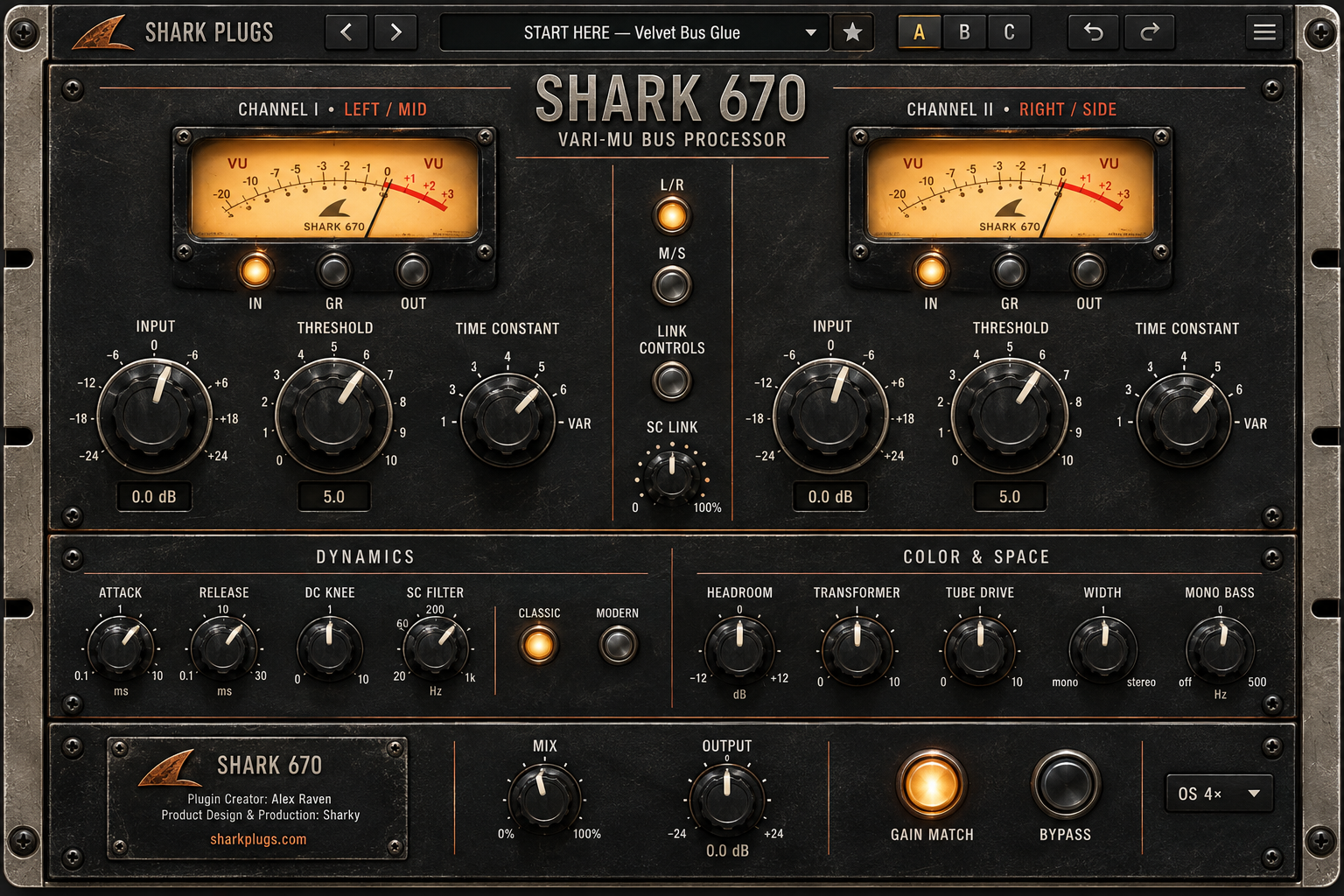
THE IDEA
Two channels work in L/R or M/S with six time constants and variable timing. Choose Classic or Modern detector behavior, shape transformer and tube color, and engage Air, Width and Mono Bass independently of compression. Compare with A/B/C, Gain Match and dual VU meters; explore 97 factory starting points.
WHAT IT GIVES YOU
Six time constants plus VAR, feedback or feed-forward detection, adjustable sidechain linking and detector filtering let the groove lead.
Rustic metal switches engage stereo shaping, compression and transformer/tube color independently. Add Air and Width while keeping bass centred.
22 Mix Bus and 24 Mastering recipes lead 97 factory presets. Auto Makeup and an additional 2 dB Output lift make musical starts assertive; check peaks and level-match with Gain Match.
PRODUCT RESOURCES
Explore the complete workflow or get the concise product overview. The SHARK 670 documents are ready to read and download.
QUESTIONS, ANSWERED
Practical answers about timing, color, spatial controls, presets and this source preview.
It is a two-channel variable-mu-inspired bus processor for mix buses, mastering, drums and groups. Compression, harmonic color and stereo shaping can each be enabled separately.
No. SHARK 670 is an original design informed by the variable-mu tradition. Its detector, coloration and stereo controls are Shark's own implementation.
Load START HERE — Velvet Bus Glue or a Mix Bus preset. Adjust Threshold for roughly 1–2 dB of gain reduction on stronger moments, compare with Gain Match, and check peaks after Output.
Musical factory presets turn on Auto Makeup and set Output 2 dB higher. Auto Makeup takes several seconds to settle. Use Gain Match for a closer RMS comparison; lower Output if the next processor sees hot peaks. Init stays neutral.
No. It compares RMS energy against the input over time, with a ±12 dB limit. It is a listening aid, not a LUFS or true-peak meter.
Stereo engages Air, Width and Mono Bass; Compressor engages gain reduction; Color engages Transformer and Tube Drive. Each switch works independently and changes are smoothed.
Link Controls couples your manual edits of Input, Threshold and Time Constant. SC Link sets how strongly the two channels share gain reduction; at 100%, the GR is equal.
Positions 1–4 use fixed timing pairs; 5–6 add program-dependent recovery. VAR lets the shared Attack and Release knobs set the time constants for whichever channels are in VAR.
Classic uses a feedback detector; Modern uses a feed-forward detector. Their compression response differs, so compare them at a similar level.
It processes the middle and side components instead of left and right. Use it to shape centre and width separately, then check the decoded output in stereo and mono.
No. It high-passes the compression detector, so bass triggers less gain reduction without directly cutting bass from the audible signal.
Air adds a gentle high shelf near 8 kHz, Width changes side level, and Mono Bass progressively removes low-frequency side content. All three respond to Stereo Engage.
Mix combines the complete processed path with latency-aligned dry audio before Output. This makes parallel compression and color possible.
It chooses actual 4×, 16× or 32× FIR oversampling. Higher rates use more CPU; all three modes report compensated latency of 68 samples in this source checkpoint. It is saved with the session, not factory presets.
Click the Shark logo to cycle rustic Blue, Green and Red. The theme is saved with the session and is separate from presets and A/B/C.
97: 22 Mix Bus, 24 Mastering, 30 Featured Engineers across five original Shark personas, 8 Drum Bus, 4 Group Bus, 8 START HERE and 1 Init. The named personas are original creative collections, not actual engineer endorsements.
No. Synthetic multitone testing measured roughly +2 dB after settling on the Mix Bus and Mastering recipes. Music varies in dynamics and spectral content. Adjust Output and watch peaks.
Yes. A/B/C stores three processing states; the browser supports search, favorites and user presets. Factory presets are protected. The hamburger menu also has Quick Manual, Credits and Auto Makeup.
The v0.6.0 source project targets macOS 12+ with AU, VST3 and Standalone configurations. It is a development preview; a customer installer, DAW integration, live appearance and listening approval are still pending.
TRY IT ON YOUR MUSIC